Sunday, July 01, 2007

Grand Central personal phone service


Just trying Grand Central out. Apparently its a way of consolidating your phone numbers. I am not a big phone user, but since using voice in Second Life, it's become more of a temptation to up my wireless service levels. So click the CALL ME button over on the right, and you will be prompted for your phone number, then automatically connected to me. Neither of us will know the real phone number if you remember to keep the little PRIVATE box checked when you fill it in.

Wednesday, April 25, 2007

USB Headset


I recently picked up a Logitech USB 350 headset to enjoy the voice filled beta of Second Life. I had a couple of ordinary headsets, with the microphone and speaker connectors, and they had always worked well. However on one machine they were simply not loud enough. Other programs such as Skype and Yahoo messenger seemed to work well, but for Second Life, people told me I was way too low.

Apparently (so I am informed) some sound connectors are just not so hot at actually connecting, hence the lower sound volume. If anyone knows different please let me know.

The headset was the first thing in a long time which didn't have an installation CD in the box. Just plug and play. It's nice to have a fairly decent set of headphones too, to listen to music, without having to switch. I suppose it is helping pick out different voices in a crowd within the Second Life voice beta, which incidentally is extremely addictive. Voices get louder as they approach, as well as tracking to the left or right depending on where that other speaker is. So far so very groovy indeed.

Monday, March 26, 2007

Accepting the inevitable


I usually have access to so much hardware, I never THOUGHT I could get too attached to any particular piece. But recently, a fairly rock solid PC was giving me serious issues. Unexpected rebooting, failing to detect the graphics card, BIOS beeping giving different messages, unexplained blank screens. By now I would be trying to get someone to get a new PC, but I installed a new power supply, different hard drives, and just kept limping along. Removed most of the components, and STILL had issues, where it was unusable and unstable at best.

While working on it, I was finding out what the different BIOS beep codes (the mysterious morse code like beeps a computer makes if it cannot display anything or start booting up) were telling me.

I came across this post at Via Arena, which told me that at the moment, my computer was convinced there was no graphics card installed. It also mentioned further down to check for leaking capacitors. It wasn't until a little while ago, I was delving in yet again, to remove even more, and tried to brush away what I mistakenly took for dust. It was hard, and looked just like an old battery which has split and is leaking its innards.

I had to sit myself down, and break the news to myself, that it was indeed time to let it go and pass on quietly.

**UPDATE** From Draele in the comments, a perfect ending.


You can see examples of normal, and leaking, capacitors here.

Friday, February 02, 2007

I got all Vista'd up


I went ahead and plunged into Windows Vista. A lot of people are saying, 'Well, I'll wait, blah di blah..."

It's going to happen eventually, so why not now.

More soon.

Thursday, December 28, 2006

Gears of War down for now


Seems that the Xbox Live servers are offline for a while. I was wondering why I couldn't get into Gears of War, unless I was signed out. I mistakenly deleted my save game data as I thought it may have become corrupted. I will have to play all over again. Is that a pain or a blessing, as the game is just so good?

Sunday, December 24, 2006

Happy Not-supposed-to-say-it-mas


It appears that Text America are going pay, as of the end of this month. So I will no longer be using their service to host my images, as $99 is a little steep when Flickr does it oh so much better.


I can see you laughing

My Christmas Present


Ok get me one of these please, thankyou.


Me after I have read the instruction booklet

Sunday, December 17, 2006

Xbox Live Vision Camera


I got me an Xbox Live vision camera, to go with the Xbox 360, but more interestingly to use it as a PC web cam. So far it's been great, apart from one big issue.

Initially I plugged it into the PC, and tried it with Skype, and MSN Messenger. Worked perfectly, no troubles at all. Then I tried it in the Xbox360, where it also worked flawlessly.

However, upon returning it to the PC, it decided not to work. Plug in, hear the 'something has just been inserted into the USB port' noise, but nothing more than that. When trying to use the camera for other programs, it now doesn't report as installed at all. The only place I can find any mention of it, is in the Device Manager, under USB Device Controllers, as "Microsoft Xbox 360 Live Vision Camera".

Yes, I have tried rebooting.
Yes, I have tried plugging it into the same USB port as before, and then other ones.
Yes, I have uninstalled the device from the Device Manager.
Yes, I have uninstalled the camera from the Device Manager, and rebooted, and tried again.

The only sign of life is after an uninstall from the Device Manager, and plugging it back in, the little balloon pops up and tells me it has detected the correct camera.

The very first time I installed it, it did not call it a camera, it called it something with the word SECURITY in it. But it DID work. I don't know if that is an issue or not, as I assumed it was because as soon as you do plug it into the computer you need an update from Microsoft.

I am open to suggestion at this time, and anyone that gets it right, wins a total and utter crushing victory on Uno against yours truly. Not saying that
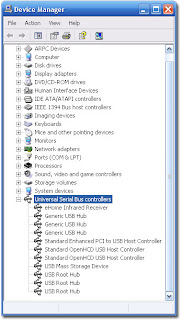


Right click MY COMPUTER
Select the HARDWARE tab
click DEVICE MANAGER
and look under USB Controllers

Wednesday, November 22, 2006

Christmas list, but by magic


Apparently, I always wanted all this for Christmas.

You can try it too, and maybe post your list in the comments. Similar lists, strangely way out stuff, or maybe things you already have?

The Wi-Fi Bunny, I really DO want, as it's probably the most tech-but-useless thing I know of. However, the cutlery, er.. not so much.

Oh no, it's that time again soon!
To post your list, just copy the address (URL) of your completed list.