
If like me, you are often at multiple computers you may want to have your Itunes library available to you where you are. This method works for me, as I never use ITunes to purchase songs, but I do use it for keeping track of podcasts.
I found that I could simply move the ITunes folder from the one PC I was using to sync up to the Ipod, onto something shared on the network. I used a 1TB World Book NAS which is always on, but I imagine you could use any shared folder on any computer on your network. Of course this folder has to be accessible to you when you are at the other machines. Now the weird part was I didn't have to move the photos and games (ok so I purchased TWO games for the Ipod) from that computer, because it just happens to be the place I sync up my Ipod if I need to. I could have, but I forgot to do it at first, and found it just worked anyway so I never bothered.
I went down into my MY MUSIC folder on that PC, and found the ITunes folder. Now it seems the file that does the work is the Itunes Library.itl file. So one drag and drop onto the shared network accessible folder, and part one is done.
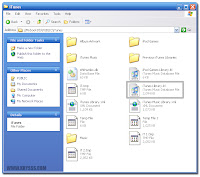 The Itunes folder on a network drive showing the all important Itunes Library.itl file
Now to get the other computers to use the same ITunes library. This is hard so you may want to print this next part out and stare at it for hours. Hold SHIFT and double click (or single click if that's how you are set up) the ITunes icon. When ITunes goes to start up it will ask you for the location of the ITunes library you want to use. Just browse to your network folder that contains your freshly moved ITunes library and more importantly the Itunes Library.itl file because thats the one that it's actually looking for. Then when ITunes starts up you will see it exactly as you left it last time on the previous computer. I tried opening it at the same time on two different machines, and I was told that the Itunes Library.itl file was locked/in use and couldn't be used until it unlocked/not in use. So as long as you only run it on one machine at a time it's no problem. Even if you do by mistake, it won't overwrite or mess anything up because it stops before it does anything at all.
You can even sync your podcasts using ITunes from ANY of your computers, as it saves them all into the same folder on your network.
The reason I did this was because of the crappy library sharing feature in ITunes. Some videos were ok but way too many just refused to play on the 'other' machine. Also doing a shared library meant that if I had watched or listened to one on the main computer the library was stored on, when I got to the other computer, because it was a shared library it assumed I was someone else and played everything from the start. Endless fast forwarding to find the right spot each time. Upon return to the main computer, some podcasts which I HAD listened to remotely, of course were listed as unlistened to. This became an issue over time as the list of podcasts became more inaccurate. Which ones had I listened to, and of the ones I had, which ones had I listened to all or merely parts of.
Sharing the library this way, means that going from one computer to another dispenses with wondering which shows were new and which were already listened to. Also the video just works because it's all coming from the same folder.
So drag your ITunes library folder to a network available folder, hold shift when you run ITunes, and select the new library location. You are done. And you can add as many computers as you like, so even visitors can peruse your collection of what ever it is you collect in there.
Something else I found useful and possibly life saving for the Ipod (or any other portable music player). If you have purchased a new computer and gotten some of those excruciatingly awful speaker sets with them, now you can use them. Any speakers that are not powered (meaning they do not need an external power supply and only have the speaker attachment wire coming out of them) are great for your Ipod. Don't go spending $50 on some 'Ipod Compatible' travel speakers, just use these. In fact it's hard to find them available anywhere outside of the purchase of a new computer, and even that is becoming less popular these days. Now back to the life saving part. What these speakers allow you to do, is to listen to your Ipod when you are in the shower, in the garden, or just somewhere where it's not convenient (or safe, or you can be bothered) to put a computer. They are plenty loud enough (unless you have already spent years with personal audio ruining your ear drums at mega-decibels) and this means you don't have to go around with headphones on, which I personally never could get used to, because of not being able to hear other normal sounds around me, as well as constantly yanking them out because I moved in a certain way. Don't forget that they will work with any music player which has the correct sized headphone socket on them. Now you can leave music and podcasts in places that typically you wouldn't want to, for fear of breaking them or even death by electrocution. But you really have to look hard for these types of speakers, because they only seem to sell the ones with power supplies, which would be louder but deadly! I did track one set down at a dollar store, and will get more if I find them.


